
Restaurant365
Restaurant365Business
4.7590.00 Reviews
- Version
- 11.7.3(7942)
- Installs
- 100.00K
- Age Rating
- Everyone
Screenshots
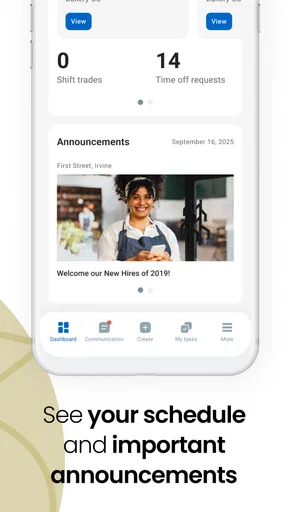
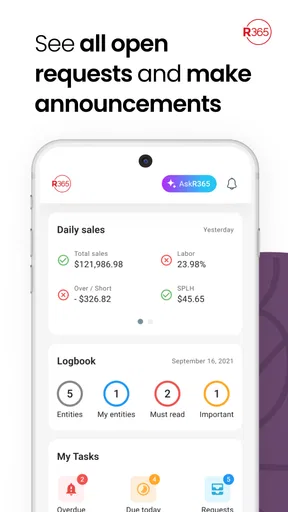
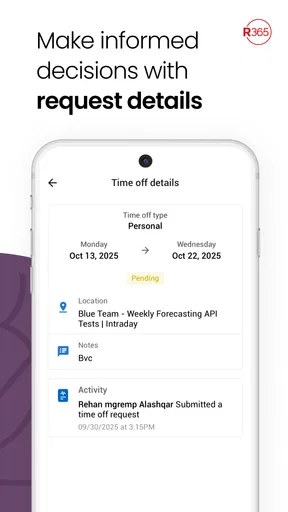
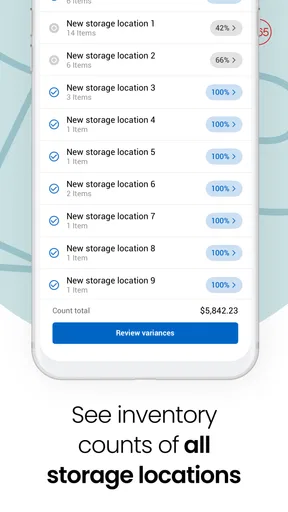
Our Review of Restaurant365
 Analysis by Appyee
If you are looking for a mobile companion for restaurant work rather than another recipe, delivery, or reservation app, Restaurant365 is aimed at a very different job. It comes from Restaurant365, sits in the business category, and is designed to keep restaurant-related work accessible from a phone. I found its value easiest to understand when I stopped treating it like a general productivity tool and viewed it as a practical extension of a restaurant operation.
The app is free to install and has an Everyone age rating, which makes the first step feel uncomplicated. It has built a 4.7 average from around ten thousand ratings, with more than one hundred thousand installs. Those figures suggest that it is not a niche experiment, but they do not automatically make it suitable for every restaurant. The important question is whether your workplace already uses the Restaurant365 environment and whether mobile access fits the way you handle daily tasks.
What to expect before you begin
My first recommendation is to set expectations correctly: this is not the kind of app that becomes useful simply because anyone can download it. Its usefulness depends heavily on the restaurant’s existing setup, the account you use, and the work your role requires. A manager, owner, accountant, or staff member may each see a different side of the experience.
That dependency is common with restaurant business software, but it matters more on a phone. A mobile screen is convenient when you are moving between a dining room, kitchen, office, or another location. At the same time, it is not automatically a replacement for a larger screen when you need to inspect complex information or complete a long administrative session.
I would think of Restaurant365 as a way to stay connected to restaurant operations while away from a desk. The most convincing use case is a person who needs to check or act on work during a busy shift, rather than someone searching for a standalone tool to run an entire business from scratch.
The current release is 11.7.3(7942), and the app requires Android 8.0 or later. That makes device compatibility worth checking before you plan a rollout across a team. A restaurant may have newer phones for managers but older devices assigned to shared work areas, so testing on the actual phones people will use is more sensible than relying on one successful installation.
The right first-time user
The best candidate is someone who already has a legitimate reason to access Restaurant365 information while mobile. For example, a general manager may need to stay aware of operational work while walking the floor, or an owner may want a convenient way to stay involved without remaining at a computer. The app can also make sense for people who divide their time between locations and need a phone-based point of access.
I would be more cautious if you are an individual restaurant worker hoping to create a complete system independently. Downloading the app does not, by itself, establish the restaurant’s records, workflow, or access structure. If your employer has not explained how the app fits into its existing process, ask before spending time trying to make it useful.
That is the first practical trade-off: the app can reduce dependence on a desk, but it does not remove the need for a properly organized business account. In my experience, understanding that distinction prevents the most common disappointment during setup.
Getting through the first setup without guesswork
I would install Restaurant365 on the phone you actually expect to carry during work, not necessarily the newest phone available. Check that it runs Android 8.0 or newer, then keep your restaurant’s account details and any workplace instructions nearby. If another person manages access for your business, involve them early instead of treating registration as a private trial.
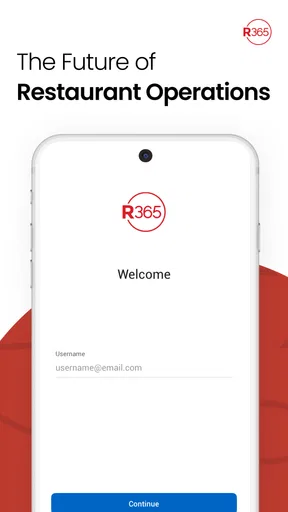
The first meaningful milestone is not merely seeing the app open. It is reaching the part of the experience that matches your role and confirming that the information or actions you need are available to your account. If the opening screen does not immediately make sense, resist the temptation to tap through randomly. Restaurant software is connected to real operational work, so guessing can waste time and create confusion about whether a problem is technical or simply related to access.
A useful setup habit is to write down the exact task you want to complete before opening the app. “I want to use the mobile app” is too vague. “I need to review the item my manager assigned,” or “I need to check the information relevant to today’s shift,” gives you a clear test. This is one of the less obvious ways to evaluate the app: judge it by the speed and confidence with which it supports your real responsibility, not by how impressive the first screen looks.
For a first-time user, the safest approach is to complete setup during a quiet moment rather than in the middle of service. A busy shift creates poor conditions for troubleshooting because you may be interrupted, using unreliable connectivity, or working under pressure. A short test before the rush can tell you whether your login, account, and role are aligned.
How to reach a first successful action
After signing in, choose one small action that has an obvious result. Avoid trying to explore every area at once. A successful first session should answer three questions: am I in the correct restaurant or business context, can I see the work intended for me, and can I complete one relevant step without switching repeatedly to another tool?
For a manager, that might mean checking information needed for the day and confirming that the mobile view is usable while moving around the restaurant. For an owner or administrator, it may mean verifying that the account presents the expected business context. For another team member, the correct first action will depend on the access granted by the workplace.
I like this gradual approach because it exposes problems early. If the account opens but the expected content is missing, that points toward a role or account issue rather than a phone problem. If the correct content appears but the screen is difficult to use, the limitation may be mobile convenience rather than access. Separating those two issues saves a lot of unproductive reinstalling.
Once the first action works, repeat it at a different moment: perhaps before a shift, during a quieter interval, and after the main work is finished. This is not about collecting statistics; it is about learning where the app fits naturally. Some mobile tools are excellent for quick checks but awkward for extended sessions. Recognizing that boundary is more useful than expecting the phone version to behave exactly like a desktop workflow.
A realistic restaurant scenario
Imagine a general manager who begins the day away from the office, walks through the restaurant, and needs to stay connected to business work while dealing with staff and service preparation. A phone-based app can be valuable here because the manager does not have to remain seated to stay informed. The meaningful benefit is continuity: the work can travel with the person responsible for it.
Later, when the manager needs to examine a larger amount of information or perform a more involved administrative task, a desktop or broader business workflow may be more comfortable. That is not a failure of Restaurant365. It is a reminder that mobile access is strongest when the task is focused, time-sensitive, and likely to happen away from a desk.
This scenario also explains why I would not recommend introducing the app without a simple team agreement. Decide which tasks belong on mobile and which should remain on the larger system. Without that boundary, people may duplicate work, wonder which view is current, or assume that a mobile screen is intended for every kind of restaurant administration.
Common confusion and how I would handle it
The biggest source of confusion is assuming that installation equals readiness. Restaurant365 is a business app, so access is tied to the organization and role using it. If you can install it but cannot reach the work you expected, do not immediately conclude that the app is broken. First check whether you are using the correct account and whether your workplace has assigned the necessary access.
Another likely point of friction is expecting identical comfort on a phone and a computer. A mobile interface is useful because it is close at hand, but a smaller display changes how much information you can comfortably review at once. I would use the phone for focused work and quick operational awareness, then move to a larger screen when the job involves extended reading, comparison, or careful administration.
It is also easy to confuse a missing option with a hidden option. Before repeatedly searching, identify whether the task is actually part of your role. In a restaurant, two people standing beside each other may legitimately see different work because their responsibilities differ. That is a sensible security and workflow arrangement, but it can feel like an app problem if nobody has explained it.
Connectivity can create another misleading impression. A mobile business workflow is naturally more exposed to weak signals, crowded networks, and interruptions than a stationary office computer. If something does not load during service, try again when the connection is stable and note whether the issue follows the account or the location. That simple comparison can tell you whether to ask an administrator for help or change where you perform the task.
I would also avoid sharing one person’s login simply to get around an access issue. Even when that seems convenient, it makes it harder to understand who is responsible for a task and can leave the wrong person seeing business information. A clean account arrangement is more important than making the first session look fast.
Where the app feels stronger than usual alternatives
The usual alternative for restaurant business work is often a desktop browser, a paper checklist, a spreadsheet, or a collection of separate communication tools. Those options can be familiar and flexible, but they also scatter information and make mobile work awkward. Restaurant365’s main advantage is the possibility of bringing restaurant-specific business access closer to the people moving through the operation.
Compared with paper, a mobile workflow is easier to carry and less dependent on remembering which folder or clipboard contains the latest information. Compared with a general notes app, it is more closely associated with the restaurant’s business context. Compared with a browser-only routine, a dedicated mobile app can feel more natural when the user is away from a desk.
Those comparisons have limits. A spreadsheet may still be better for custom calculations, a desktop interface may be better for broad review, and a simple note may be faster for an informal reminder. I would not replace every existing tool just because a mobile business app is available. The sensible choice is to give Restaurant365 the work it handles naturally and keep specialized tools for tasks they serve better.
Who should skip it
I would skip Restaurant365 if you want a general-purpose personal finance app, a point-of-sale replacement, a staff chat tool, or a restaurant discovery service. Its business focus makes it a poor match for those needs. I would also hesitate if your workplace does not use Restaurant365 or has no clear plan for how employees should access it.
It may be the wrong choice for someone who does nearly all work at a computer and rarely needs mobile access. In that situation, the phone installation may add another place to check without solving a real problem. Likewise, if your restaurant needs highly customized reporting or a workflow built around tools outside this ecosystem, compare the effort of adapting your habits before committing.
On the other hand, it is a reasonable candidate for restaurant professionals who need business access while moving between locations or handling a shift. The free price lowers the barrier to trying it, but the real cost is organizational: time spent learning the workflow, clarifying roles, and deciding which tasks belong on mobile.
Making the next step useful
After the first successful action, I would create a small routine rather than opening the app aimlessly. Use it at a predictable point in the workday when its information or actions matter. Then ask whether it shortened a process, reduced a trip to the office, or made a responsibility easier to follow. If the answer is no, the problem may be that the workflow needs adjustment rather than that you need more app exploration.
A second useful step is to agree on a handoff between mobile and desktop work. For instance, a manager can use the phone while handling the floor, then finish deeper review at a computer. That division keeps the mobile experience focused and avoids forcing a small screen to carry every part of the business process.
If you are introducing the app to a team, start with one role and one repeatable task. Let that person become comfortable with the path from opening the app to completing the task, then explain the same boundary to others. This is more reassuring than giving everyone a long list of possibilities. It also makes it easier to identify whether a difficulty comes from training, permissions, device compatibility, or the workflow itself.
Restaurant365 has been available since Apr 17, 2019, and its ongoing presence in the business category gives it the feel of an established mobile companion rather than a temporary experiment. Still, longevity does not remove the need for a local test. Every restaurant organizes responsibilities differently, and the app’s usefulness depends on how well those responsibilities connect to the account and the tasks you need to perform.
My final view is straightforward: I would recommend Restaurant365 to a restaurant professional who already belongs to a Restaurant365-based operation and wants practical access away from a desk. I would not recommend downloading it without knowing what your role should accomplish inside it. The best first goal is one clear, repeatable restaurant task completed with confidence. If the app achieves that, its mobile convenience can become genuinely valuable; if it does not, a desktop workflow or a simpler tool may be the more honest choice.
Verdict
Strengths of Restaurant365
- Centralizes restaurant accounting, payroll, scheduling, and operations.
- Provides detailed reports to support faster, data-driven decisions.
- Automates invoice processing and reduces repetitive administrative work.
- Supports multi-location businesses with standardized workflows and controls.
- Integrates with several restaurant-focused POS and payment platforms.
Limitations of Restaurant365
- Most useful features require a paid business subscription.
- The interface can feel complex for first-time users.
- Setup may take considerable time for larger restaurant groups.
- Some integrations may require extra configuration or services.
- Primarily designed for businesses, not individual restaurant owners.
Similar Picks in This Category
View All
LinkedIn: Community & Network
LinkedIn3.8

Zoom Workplace
zoom.com4.1

Microsoft Teams
Microsoft Corporation4.6

Meta Business Suite
Meta Platforms, Inc.4.6

Webex Meetings
Cisco Systems, Inc.4.5

TeamViewer Remote Control
TeamViewer4.4
Frequently Asked Questions
What is Restaurant365 used for?
Restaurant365 is a restaurant management platform designed to bring accounting, inventory, scheduling, payroll, purchasing, and operational reporting into one system. It is primarily intended for restaurant owners, operators, accountants, and multi-location groups rather than casual diners. Before downloading or subscribing, users should understand that the app works best when connected to a broader Restaurant365 account and configured for their business workflows.
Can Restaurant365 be used by a single restaurant or only by large restaurant groups?
Restaurant365 can support both independent restaurants and larger multi-location operations, although the available tools and subscription requirements may vary. A small restaurant may use it for bookkeeping, invoices, inventory, labor management, and reporting, while larger groups can benefit from centralized oversight across locations. Prospective users should contact Restaurant365 to confirm which plan and features match their number of sites and operational needs.
Does Restaurant365 include accounting, payroll, and inventory management?
Restaurant365 offers a broad collection of restaurant-focused tools, including accounting, accounts payable, purchasing, inventory control, labor scheduling, payroll-related services, and business reporting. However, not every feature is necessarily included in every package, and some services may require separate setup, integrations, or additional fees. Businesses should review the current plan details carefully before assuming that all functions are available immediately after installation.
Is Restaurant365 easy to learn for restaurant owners and employees?
The platform is built for restaurant operations, but its many modules can require an initial learning period. Managers and accountants may need training to configure recipes, vendors, permissions, accounting rules, inventory counts, and reporting correctly. Once set up, the centralized dashboard can reduce repetitive work and improve visibility, but the overall experience depends on accurate data entry, staff adoption, and the complexity of each restaurant’s existing processes.
What should I check before downloading or subscribing to Restaurant365?
Before proceeding, verify device compatibility, account requirements, pricing, contract terms, included modules, onboarding support, and integrations with your point-of-sale, payroll, banking, and payment systems. Restaurant365 is a professional business platform, so it may not be suitable for someone seeking a simple free app. You should also confirm whether mobile features meet your needs, especially if managers will use the service while away from a computer.
